Connections
Connections allow GRiPOFlow to securely communicate with external platforms and services. They store authentication credentials separately from workflows, allowing you to connect to cloud providers, SaaS applications, AI platforms, APIs, and infrastructure without exposing sensitive information inside your workflow.
Once a connection is created, it can be reused across multiple workflows, reducing duplicate configuration and making credential management simpler and more secure.
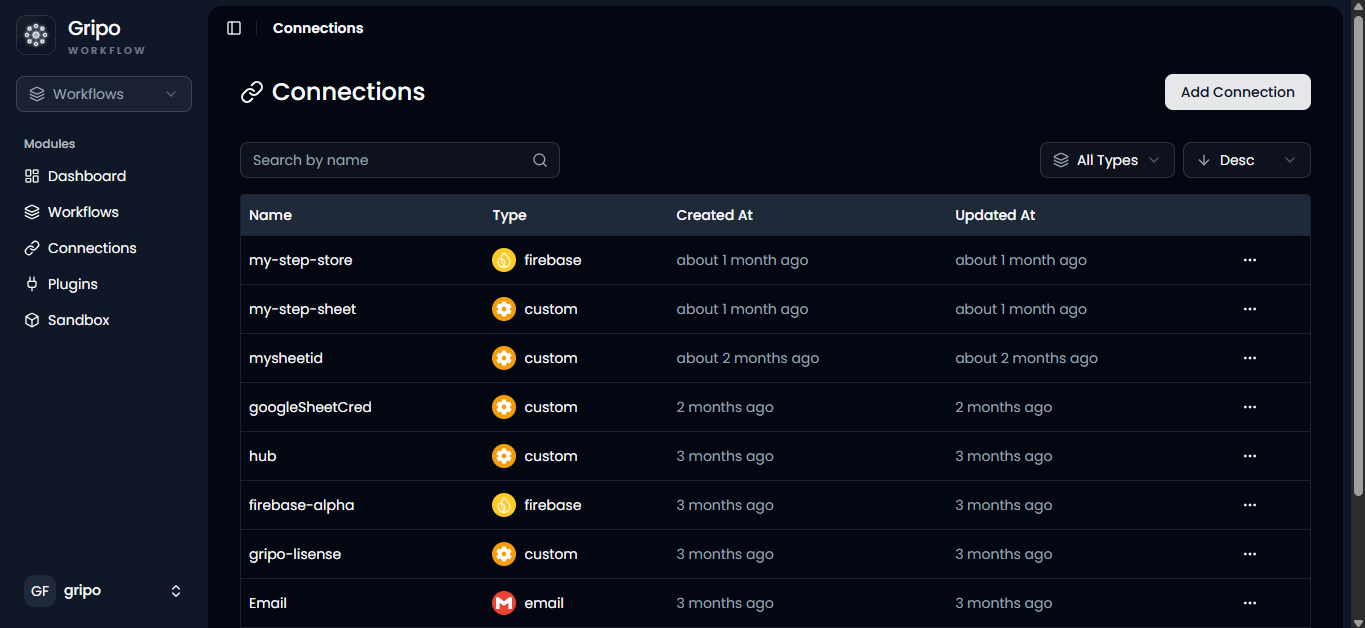
What is a Connection?
A connection is a secure container that stores the credentials required to authenticate with an external service.
Instead of entering API keys, tokens, passwords, or OAuth credentials every time you build a workflow, you create a connection once and reference it whenever it is needed.
Connections can be used with providers such as:
- Azure
- AWS
- Google Cloud
- GitHub
- Slack
- OpenAI
- Firebase
- OVH Cloud
- SSH
- and many more.
Why Use Connections?
Using connections helps separate authentication from workflow logic, making workflows easier to build, maintain, and secure.
With connections you can:
- Reuse the same credentials across multiple workflows.
- Update credentials without modifying existing workflows.
- Keep secrets outside workflow definitions.
- Reduce manual configuration errors.
- Standardize integrations across your organization.
- Simplify workflow maintenance.
Benefits
Connections provide several advantages for workflow automation:
| Benefit | Description |
|---|---|
| Centralized Credential Management | Store credentials in one location instead of every workflow. |
| Reusability | Use one connection across multiple workflows and plugins. |
| Improved Security | Sensitive information remains separate from workflow definitions. |
| Easy Maintenance | Update credentials once without editing every workflow. |
| Consistency | Standardize how teams connect to external services. |
| Faster Workflow Development | Reuse existing connections when building new automations. |
Connection Types
GRiPOFlow supports two types of connections.
Provider Connections
Provider Connections are pre-configured integrations for supported platforms. They contain provider-specific fields and make it easy to connect popular services.
| Cloud Providers | Development & AI | Communication |
|---|---|---|
| AWS | GitHub | Slack |
| Azure | OpenAI | |
| Google Cloud | Claude Code | |
| DigitalOcean | Firebase | |
| Linode | OVH Cloud |
Provider Connections include provider-specific fields and are the recommended choice whenever the service you want to integrate is supported by GRiPOFlow.
Custom Connections
Custom Connections allow you to authenticate with services that are not available as predefined providers.
| Authentication Method | Description |
|---|---|
| API Key | Authenticate using an API key issued by the service provider. |
| OAuth 2.0 | Authenticate using the OAuth 2.0 authorization flow. |
| Key-Value | Authenticate using custom key-value pairs or headers required by an API. |
Custom Connections are ideal for internal APIs, third-party services, or any application that does not have a dedicated provider in GRiPOFlow.
Provider vs Custom Connections
Choose the connection type that best fits your integration.
| Feature | Provider Connection | Custom Connection |
|---|---|---|
| Purpose | Connect to supported services | Connect to unsupported or custom services |
| Setup | Provider-specific fields | Generic authentication methods |
| Authentication | Predefined by the provider | User-configurable |
| Best For | AWS, Azure, GitHub, OpenAI, etc. | Internal APIs, custom services, proprietary platforms |
| Recommended When | A dedicated provider exists | No provider integration is available |
Connection Lifecycle
Connections follow a simple lifecycle throughout their use in GRiPOFlow.
- Create a connection.
- Configure the required authentication credentials.
- Save and validate the connection.
- Use the connection in workflows or plugins.
- Update credentials whenever necessary.
- Delete the connection when it is no longer required.
Updating a connection automatically makes the latest credentials available to workflows that reference it.
Security
GRiPOFlow is designed to help protect sensitive credentials.
Best security practices include:
- Store credentials only in Connections.
- Never hardcode API keys or passwords inside workflows.
- Use separate connections for development and production environments.
- Rotate API keys and tokens regularly.
- Grant only the permissions required for the integration.
Best Practices
To get the most from Connections:
- Use descriptive names such as Production AWS, GitHub Enterprise, or Slack Notifications.
- Reuse existing connections whenever possible.
- Remove unused or expired connections.
- Keep credentials updated before they expire.
- Use Provider Connections whenever available.
- Use Custom Connections only for unsupported services or custom APIs.
Next Step
After understanding how Connections work, the next step is creating your first connection.
👉 Go to Create Connection to securely add credentials and start using them in your workflows.